ScaleRankings vs CTRTool: CTR Campaigns for Organic CTR
You are comparing two CTR tools and need a clear answer, not a feature dump. Organic click-through rates shape how your pages perform in Google and Bing, and the wrong campaign setup wastes both budget and time. This comparison gives you a direct verdict.
By the end, you will know how CTRTool and ScaleRankings differ on proof, campaign coverage across Google, Bing, Maps and AI Overviews, visit controls, and pricing. You will also see which tool fits your workflow, so you can pick one with confidence rather than guesswork.
Quick Verdict: ScaleRankings vs CTRTool for Organic CTR Campaigns
If you need verifiable proof for every CTR visit and support for Google, Bing, Maps, and AI Overviews, CTRTool is the stronger choice; if you prioritize a different feature mix, ScaleRankings may fit better.
Both tools sit in the CTR campaign space, where the goal is to influence organic CTR and the user behavior signals that feed into search results. The practical difference comes down to how much evidence you get for each visit and how many platforms a campaign can cover.
The table below compares the two on the factors that matter most when you are running a CTR campaign: proof, coverage, controls, and pricing transparency. CTRTool's column reflects its verified feature set. ScaleRankings is described in general terms only, so treat those entries as points to confirm directly with the vendor.
| Factor | CTRTool | ScaleRankings |
|---|---|---|
| Visit proof | Screenshot proof for every visit, with search and landing screenshots as separate proof images, plus full visit paths | Proof options should be confirmed with the vendor before committing |
| Platform coverage | Google, Bing, Maps, and AI Overviews | Coverage varies by plan and should be verified |
| Position tracking | Keyword positions tracked over time, including Maps listing order and AI citation order | Typically offered in some form; scope is unclear |
| Billing model | Pay-for-results credits, no credits charged for technical failures before landing, no credits used when a visit cannot verify the requested location | Pricing structure should be requested in writing |
| Capacity | Up to 100 campaigns with 100 keywords each; visits up to 5 minutes with up to 5 additional internal pages | Limits are plan-dependent and not confirmed here |
| Credit handling | One shared balance across all campaign types, websites, and keywords; unused credits roll over while subscribed | Unknown; ask about expiry and sharing rules |
The clearest differentiator is screenshot proof for every visit. When you report on a campaign, a separate search screenshot and landing screenshot, tied to a full visit path, gives you something concrete to show. That matters for CTR tracking because it lets you separate a visit that actually happened from one you are simply told happened.
Multi-platform support is the second differentiator. Campaigns can target Google, Bing, Maps, and AI Overviews, which reflects how SERP features now spread clicks across the local pack, map results, and AI-generated answers. A campaign built only around classic blue links covers less of that surface.
ScaleRankings deserves a fair look on its own merits. Its feature mix may suit teams with different priorities, and nothing here suggests otherwise. The honest position is that its proof standards, platform coverage, and pricing terms should be checked against your own requirements rather than assumed.
- Choose CTRTool if per-visit evidence, broad platform coverage, and a pay-for-results credit model are your priorities.
- Evaluate ScaleRankings directly if its feature mix matches a need CTRTool does not address for you.
- Ask both vendors how failed or unverifiable visits are billed before you commit budget.
For most teams running organic CTR campaigns, the deciding question is simple: can you prove what you paid for? CTRTool answers that with screenshots and visit paths. ScaleRankings may answer it too, but you will want written confirmation first.
At a glance: how CTRTool compares to ScaleRankings on the features that matter most.
| Feature | CTRTool | ScaleRankings |
|---|---|---|
| Pricing | $59-$699/mo | — |
| Free plan / trial | ✗ | — |
| Screenshot proof per visit | ✓ | — |
| Google Search CTR campaigns | ✓ | — |
| Bing Search CTR campaigns | ✓ | — |
| Google Maps CTR campaigns | ✓ | — |
| AI Overview CTR campaigns | ✓ | — |
| Geo targeting (country/state/city) | ✓ | — |
What Is CTRTool?
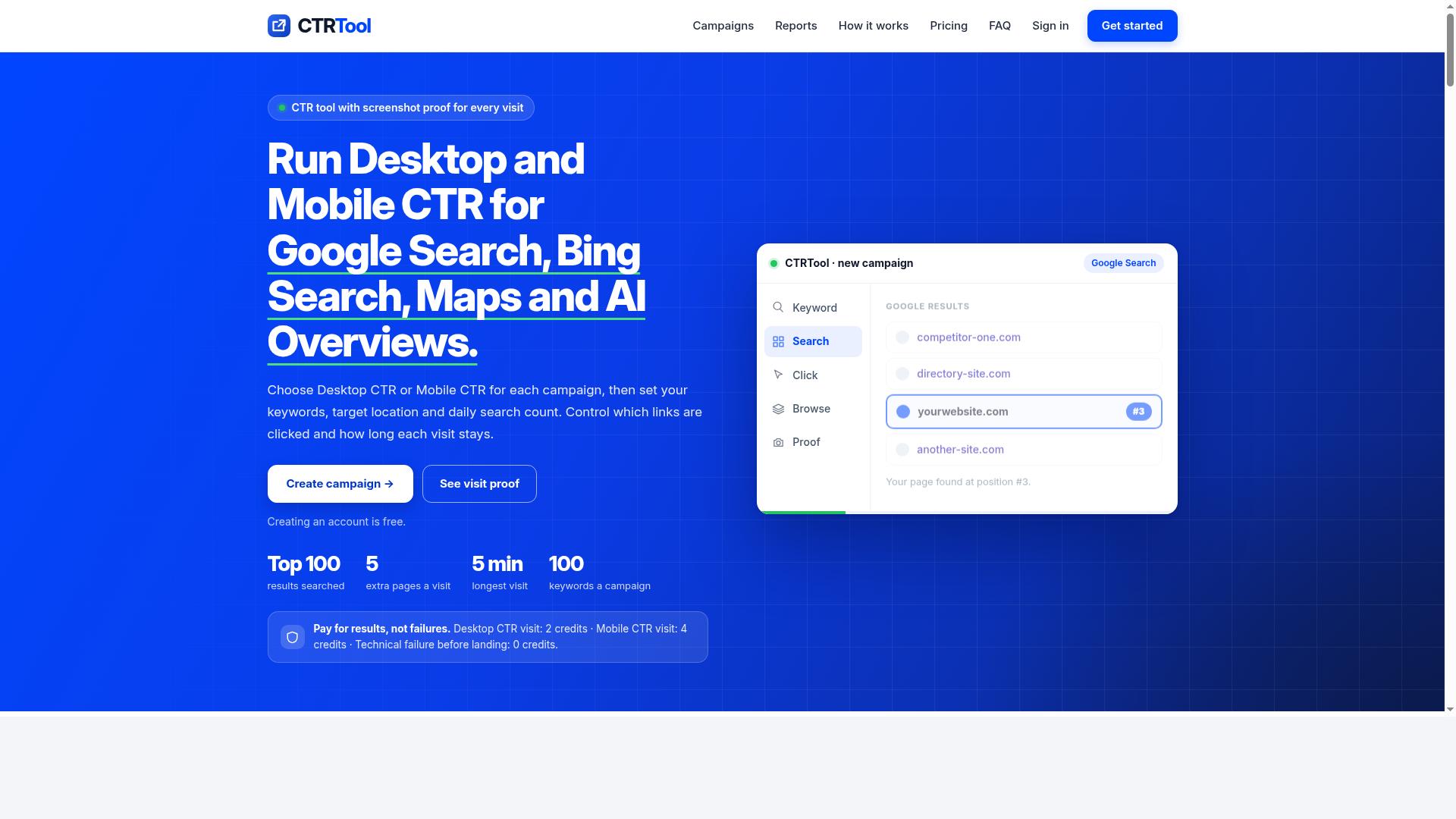
CTRTool is a SaaS platform that runs desktop and mobile CTR campaigns for Google Search, Bing Search, Google Maps, and AI Overviews, providing screenshot proof for every visit. Its core purpose is simulating organic clicks to improve CTR signals on the search results your pages already rank for.
Rather than treating every campaign the same, users choose Desktop CTR or Mobile CTR per campaign. That distinction matters because device type shapes how a result is displayed, how much of the SERP is visible, and how users typically interact with it.
Setup is built around the targeting details that define a realistic campaign. Users set target keywords, a target location, and a daily search count, then control which links get clicked and how long each visit stays. This gives campaigns a defined shape instead of a vague stream of visits.
Every visit is documented. CTRTool provides screenshot proof for each one, so users can review what actually happened rather than trusting an activity counter. For teams that need to show evidence of campaign execution, that record is the practical difference.
The platform is positioned as a CTR tool with proof, delivered as a global online service. It does not promise rankings. The site states plainly that automated visits do not guarantee rankings, which keeps expectations grounded in signal support rather than certainty.
In the context of this comparison, CTRTool's role is narrow and clear: it is the campaign execution layer for organic CTR work. It handles device choice, keyword and location targeting, visit duration, and proof of delivery. Judging results still depends on your pages, your query selection, and how search engines treat behavior signals over time.
What Is ScaleRankings?
ScaleRankings is another tool in the organic CTR campaign space, though its exact features and pricing should be verified directly with the provider. It appears in discussions alongside other CTR and SEO tools, which is why readers often compare it with alternatives before choosing a platform.
Because public information about ScaleRankings is limited and can change over time, this article avoids stating specific capabilities, plan tiers, or costs. Always confirm current details on the provider's official website before drawing conclusions about fit or value.
What can be said with confidence is the category it belongs to. Tools like this generally aim to support organic CTR work, which means helping site owners influence how often their pages earn clicks in search results.
That work typically touches several areas of a campaign:
- Planning and running a CTR campaign across selected pages or keywords
- Monitoring impressions, clicks, and click share over time
- Reviewing position tracking and keyword ranking movement
- Testing changes to title tags and meta descriptions
These are common building blocks in the space, not confirmed ScaleRankings features. Readers should treat them as a checklist of questions to ask rather than a description of any single product.
It also helps to understand where such tools sit in the wider SEO stack. A CTR platform is not a replacement for keyword research or technical auditing. It supports a narrower goal: improving the click-through rate a page earns when it already appears in the SERP.
For a fair comparison, gather the same information about each provider: what the tool actually does, how campaigns are configured, what reporting is included, and what the total cost looks like over a few months. Verify each point at the source. That approach keeps a ScaleRankings vs CTRTool decision grounded in facts rather than assumptions.
Features Compared
This section breaks down the key feature areas where CTRTool and ScaleRankings differ, from proof mechanisms to platform coverage and campaign controls. The goal is to help you judge which tool fits the way you plan and run a CTR campaign for organic CTR.
The comparison focuses on three areas that matter most in practice. First, how each platform proves that a visit actually happened. Second, which search surfaces a campaign can target. Third, what controls and tracking you get once a campaign is running.
Each area is covered in its own subsection below, with specifics rather than general impressions. Where information about ScaleRankings is not publicly verifiable, the section says so plainly instead of guessing. That keeps the comparison honest and tells you exactly what to confirm with that provider before committing budget.
Proof, Transparency and Visit Paths
CTRTool provides screenshot proof for every visit, including separate search and landing screenshots, and full visit paths, setting a high bar for transparency. You can see the SERP as it appeared and the destination page as it loaded, rather than relying on a summary report alone.
Keyword positions are tracked over time as part of the reporting. That includes Maps listing order and AI citation order, so you can watch how a page moves across surfaces, not just whether a click was recorded.
- Search screenshot for each visit
- Landing screenshot as a separate proof image
- Full visit path showing how the session progressed
- Keyword positions over time, including Maps and AI citation order
The credit model adds another layer of accountability. CTRTool does not charge credits for technical failures that occur before landing, and visits that cannot verify the requested location use no credits. That structure ties cost to delivered visits.
Proof mechanisms on ScaleRankings should be verified directly with that provider. Public information is not specific enough to describe its reporting in detail, so confirm what evidence you receive per visit before comparing the two on transparency.
Campaign Coverage: Google, Bing, Maps and AI Overviews
CTRTool supports Google Search CTR, Bing Search CTR, Google Maps CTR, and AI Overviews campaigns, covering major search surfaces beyond standard organic results. That breadth matters because organic CTR is no longer decided on one results page alone.
Google Search campaigns target a keyword and click the organic result, on desktop or mobile, within the top 100 results. Bing Search campaigns follow the same pattern for Bing, which helps when you want coverage across engines rather than a single index.
Google Maps campaigns find a business listing and click its website link, checking up to 50 listings with city targeting. AI Overview campaigns require a matching source link, then find the website in the overview and click that link. This addresses SERP features that sit above or beside traditional blue links.
ScaleRankings' coverage across these surfaces should be confirmed with the provider. Its public materials do not give a clear, verifiable list of supported campaign types, so treat any assumptions about Maps or AI Overview support as unconfirmed until you check.
Campaign Controls and Tracking
CTRTool lets users choose desktop or mobile CTR per campaign, set target keywords and locations, and track keyword positions over time, including Maps and AI citation order. Location targeting spans country, state, and city, or any country when you want broader reach.
Campaign setup goes beyond the basics. You can set daily search counts with now, spread out, or gap timing, choose days, hours, and time zone, and define the target URL, internal page URLs, and link text. Click order and scrolling time are configurable, and visits can run up to five minutes with up to five additional internal pages.
One requirement shapes planning: the page must appear within the top 100 organic results for the chosen keyword and location. Daily goals reset at 00:00 UTC, and one credit balance covers all campaign types, websites, and keywords, with up to 100 campaigns and 100 keywords each. Unused credits roll over while subscribed.
Controls on ScaleRankings should be verified directly with that provider. Its interface and targeting options are not documented in enough public detail to describe here, so ask about device selection, geo targeting, and position tracking before you compare setups side by side.
Pricing Compared
CTRTool offers monthly plans starting at $59 for 2,000 credits (up to 1,000 desktop or 500 mobile CTR visits), with higher tiers available, while ScaleRankings' pricing should be checked on its official site. Because ScaleRankings does not publish a clear, stable rate card that can be quoted reliably here, readers weighing the two tools should confirm current costs directly before committing to either platform.
CTRTool's published tiers make budgeting for a CTR campaign straightforward. Every plan is priced in USD and credits convert at a fixed rate, so you can estimate the cost of a given volume of desktop or mobile visits before you spend anything.
| Plan | Monthly Price | Credits | Up to Desktop Visits | Up to Mobile Visits |
|---|---|---|---|---|
| Starter | $59 | 2,000 | 1,000 | 500 |
| Growth (Recommended) | $125 | 5,000 | 2,500 | 1,250 |
| Scale | $399 | 20,000 | 10,000 | 5,000 |
| Agency | $699 | 40,000 | 20,000 | 10,000 |
The credit system matters when comparing value. A desktop CTR visit costs 2 credits and a mobile visit costs 4, while a verified search without a match costs 1 credit and a technical failure before landing costs 0. That structure means failed visits do not drain your budget the way a flat per-click fee might.
Two other details affect the real cost of ownership. Unused credits roll over while your subscription is active and expire when cancellation takes effect, which rewards steady campaign planning over stop-start buying. Creating an account is free, and custom development carries a separate one-time fee agreed in advance.
CTRTool also displays limited launch pricing, noting that prices rise 30% on November 15. Anyone comparing plans against ScaleRankings should factor in that timing, since locking in the current rate changes the long-term math. For readers running ongoing organic CTR work across multiple pages, the transparent credit-to-visit ratio on the Growth and Scale tiers is easier to forecast than an opaque quote.
Who Should Choose CTRTool
CTRTool suits SEO practitioners and agencies who need verifiable proof for every CTR visit and require coverage across Google, Bing, Maps, and AI Overviews. That combination of accountability and platform range is the core reason teams pick it over alternatives.
When you run a CTR campaign for a client, the deliverable is not just activity. It is evidence. Screenshot proof turns a vague promise of "sessions delivered" into something a client or stakeholder can review directly, which matters when budgets and renewals are on the line.
CTRTool is a global online service with location targeting. That makes it practical for agencies managing local campaigns, multi-region clients, or sites where search results differ meaningfully by geography. You can align a campaign with the market you are actually trying to influence.
Typical CTRTool Users
The tool fits a fairly specific profile. If several of the following describe your situation, CTRTool is likely the stronger match in this comparison.
- Agencies running campaigns for client sites, where proof of delivery and reporting clarity matter as much as the campaign itself.
- SEO professionals working on their own properties, who want to test how click-through rate and engagement metrics respond before scaling.
- Teams using tier links, PBNs, and test properties, which the site's own guidance references as part of structured link and traffic setups.
- Practitioners targeting multiple surfaces, including Google Search, Bing Search, Google Maps, and AI Overviews, rather than a single engine.
- Anyone who needs to show screenshots as part of internal review or client reporting.
What ties these users together is a preference for documented delivery over opaque volume. They are less interested in raw click counts and more interested in whether each visit can be accounted for.
Why Proof and Coverage Matter
Click-through rate campaigns touch sensitive areas. Search engines treat CTR manipulation and automated traffic as behavior to detect, so practitioners need to think carefully about how campaigns are structured. Having a record of what was delivered helps teams review campaigns honestly and adjust.
Platform coverage is the second differentiator. Google Search alone no longer reflects the full picture. AI Overviews and Maps results now shape how users encounter brands, and Bing remains a meaningful source of impressions for many sites. A tool that spans these surfaces matches how modern SERPs actually behave.
Location targeting adds a third layer. Local pack visibility and regional search results can differ sharply, so campaigns that ignore geography may miss the audience that matters. For agencies with clients in multiple cities, that flexibility is not a nice extra. It is a baseline requirement.
| User Profile | Why CTRTool Fits |
|---|---|
| Agency managing client sites | Screenshot proof supports client reporting and campaign review |
| SEO professional testing own properties | Multi-platform coverage across Google, Bing, Maps, and AI Overviews |
| Local or multi-region campaigns | Location targeting aligns visits with the target market |
| Teams using tier links, PBNs, or test properties | Matches the structured setups referenced in the site's guidance |
If your priority is a single-engine, volume-first approach with minimal reporting overhead, CTRTool may be more structure than you need. For everyone else, the proof and coverage combination is the practical reason to choose it.
Who Should Choose ScaleRankings
ScaleRankings may be a better fit for teams whose priorities align with its specific feature set, which should be evaluated directly with the provider. What suits one SEO team can feel like a mismatch for another, so the decision should rest on your own workflow rather than on broad marketing claims.
Before committing, list the tasks your CTR campaign depends on. Then check whether the platform's published documentation covers each one. Direct evaluation beats assumption when comparing any two tools in this category.
Some teams prefer a general-purpose SEO suite that bundles rank tracking, audits, and reporting alongside CTR work. Others want a narrower focus on organic CTR and the signals around it. Neither preference is wrong, but they lead to different shortlists.
ScaleRankings tends to appeal to buyers who value a broader platform footprint and are willing to configure it around their existing process. If your team already runs several SEO functions in one place, consolidating may feel simpler on paper. Confirm the details with the vendor before you rely on them.
Ask these questions during your evaluation:
- Does the tool's stated scope match how your team actually runs a CTR campaign?
- How does it handle CTR tracking and reporting on impressions, clicks, and click share?
- Are A/B testing and snippet optimization part of the workflow, or handled elsewhere?
- What does onboarding look like for your team size and technical comfort?
- How transparent is the provider about limits, terms, and acceptable use?
Teams with heavy in-house development resources may also weigh flexibility and customization more heavily than out-of-the-box simplicity. That is a legitimate trade-off, and it is one only you can score for your own situation.
Keep expectations grounded. A platform choice supports your organic CTR efforts, but it does not replace sound title tags, meta descriptions, and rich snippets. Snippet quality remains a major driver of click-through rate regardless of the tool in use.
If ScaleRankings' published offerings line up with your priorities, it deserves a place on your shortlist. If your focus is narrower and centered on running and measuring CTR campaigns, compare that scope against what a dedicated tool provides before deciding.
Final Verdict
CTRTool stands out for its screenshot proof, multi-platform campaign coverage, and transparent pricing, making it a strong choice for SEOs who prioritize verifiability. Every visit in a CTR campaign comes with documented evidence, so you can see what happened rather than take a report on faith. That level of proof matters when you are spending budget on organic CTR work and need to justify the spend.
ScaleRankings may suit other needs, and some teams may find its approach appealing depending on their workflow. However, the details behind its campaigns are less clear from publicly available information, so it is harder to compare on equal footing. Verifiability is the dividing line here, and CTRTool makes that its core promise.
The table below summarizes the key differentiators based on available information:
| Factor | CTRTool | ScaleRankings |
|---|---|---|
| Proof of visits | Screenshot proof for every visit | Not clearly documented publicly |
| Platform coverage | Google, Bing, Maps, and AI Overviews | General campaign options, specifics unverified |
| Pricing | Clear pricing tiers | Pricing structure not confirmed |
| Support contact | Listed support email in FAQ | Not confirmed |
For readers running CTR campaigns aimed at improving organic CTR, the combination of proof, platform reach, and published pricing removes much of the guesswork. Transparent tiers let you match spend to scope before committing, which is useful when testing snippet optimization or title tag changes across search results.
If possible, test both tools on a small campaign and compare the reporting depth. CTRTool's screenshot evidence gives you a concrete baseline for that comparison. For questions, CTRTool can be contacted at vaibhav@autoblogging.ai for support.
Frequently Asked Questions
What is the core difference between CTRTool and ScaleRankings for running CTR campaigns?
CTRTool is a dedicated CTR campaign platform for Google Search, Bing Search, Google Maps and AI Overviews, and every visit comes with screenshot proof. Because the research available on ScaleRankings doesn't detail its features or campaign capabilities, we can't make a feature-by-feature comparison - so the practical difference is that CTRTool publishes exactly what it does and how it does it. If you're evaluating both, ask ScaleRankings for the same specifics (platforms supported, proof of visits, targeting options) and compare like for like.
Does CTRTool provide proof that campaign visits actually happened?
Yes - screenshot proof is a core part of CTRTool. Each visit includes search and landing screenshots as separate proof images, plus full visit paths, so you can verify what happened rather than taking it on trust. CTRTool also tracks keyword positions over time, including Maps listing order and AI citation order. This makes it straightforward to audit results for your own site or client sites.
Which platforms and campaign types can I run with CTRTool?
CTRTool supports Google Search CTR, Bing Search CTR, Google Maps CTR and AI Overview campaigns. For each campaign you choose Desktop CTR or Mobile CTR, set your keywords, and target a country with an optional state and city (or "Any country" for a mix of supported locations). Search campaigns work with keywords where your page appears in the top 100 organic results, Maps campaigns check up to 50 listings, and AI Overview campaigns require a matching source link.
How does CTRTool's pricing work compared to ScaleRankings?
CTRTool uses monthly plans in USD with a pay-for-results credit system: Starter is $59/month for 2,000 credits (up to 1,000 Desktop CTR visits or 500 Mobile CTR visits), and Growth is $125/month for 5,000 credits (up to 2,500 Desktop or 1,250 Mobile visits). ScaleRankings' pricing isn't stated in the sources we reviewed, so we can't compare costs directly - check their site for current plans before deciding. If budget predictability matters to you, CTRTool's credit-to-visit conversion is published up front.
Can I target specific locations and devices with CTRTool?
Yes. Every CTRTool campaign lets you choose Desktop CTR or Mobile CTR, and you can target a chosen country with an optional state and city, or select "Any country" to draw on a mix of supported locations. This applies across Google Search, Bing Search, Maps and AI Overviews campaigns. ScaleRankings' targeting options aren't described in the available research, so confirm those directly with them if granular geo-targeting is important to you.
Who is CTRTool built for, and how do I get support?
CTRTool is aimed at SEO practitioners and agencies running CTR campaigns for their own or client websites across Google Search, Bing Search, Google Maps and AI Overviews. It's a global online service with no stated country restrictions, and support is available via vaibhav@autoblogging.ai. If you're comparing tools, start by confirming that ScaleRankings offers the same platform coverage and proof-of-visit reporting you need.